
Free AI Search Visibility Audit Tool: Check Your Brand Now
visibility audit
Your website ranks on Google. But when a customer asks ChatGPT “Who’s the best [your service] in [your city]?”, your brand doesn’t come up. Your competitors do.
We hear it on almost every call. Brands are asking their agencies “Are we showing up in ChatGPT?”, and most teams aren’t sure how to check.
SEOPulse’s free brand scan takes four screens: your details, your region, 5 to 8 buyer questions and 3 to 5 competitors. A few minutes later, it shows who AI recommends instead of you and which websites it trusts.
| Step | What you do | What you leave with |
|---|---|---|
| 1 | Enter your details | Your scan set up for the right website |
| 2 | Choose your region | Results that match where your customers are |
| 3 | Add up to 8 prompts | A focused set of buyer questions |
| 4 | Add 3–5 competitors | A fair benchmark to measure against |
| 5 | Read your results | Your score, competitors and the sources AI trusts |
| 6 | Diagnose the cause | A clear next action |
What is AI search visibility?
AI search visibility measures whether your brand appears in AI-generated answers. It’s different from SEO because there’s usually one answer, not a list of results to rank in.
In SEO, you track where a page ranks for a keyword. In AI search, your brand is either in the answer or it isn’t.
AI engines show your brand in two ways:
| Outcome | What it means | What it doesn’t prove |
|---|---|---|
| Mention | AI names your brand in the answer | That your website is linked |
| Citation | AI links to your page as a source | That AI recommends you |
These rarely happen together. In August 2026, we ran 755 buyer questions through five AI engines. Across 6,811 answers:
- 53.4% mentioned a tracked brand
- 34.2% included that brand’s website in their sources
- Only 10.0% did both
That’s why a useful check tracks mentions and citations separately.
What does a free AI visibility audit actually check?
SEOPulse’s free brand scan checks whether AI engines mention and cite your brand for the questions you choose. It doesn’t check whether AI bots can technically read your website. That’s a separate test, and we show you how to do it below.
Many free “AI visibility checkers” mix these two tests together. Knowing which one you’re running saves a lot of confusion.
| The free scan checks | It doesn’t check | |
|---|---|---|
| Visibility | Whether AI mentions or cites your brand for up to 8 questions | Every question your customers might ask |
| Competitors | How you compare with the 3–5 competitors you choose | Your full competitor set across every market |
| Sources | Which websites AI uses to answer your questions | How answers change over time |
| Your website | n/a | Whether AI bots can read your pages (you can check this yourself in 5 minutes) |
In short, the scan answers “Does AI recommend us?” If the answer is no, the rest of this guide helps you work out why.
How to run the free scan: screen by screen
SEOPulse’s free brand scan has four short screens and takes a few minutes to complete. Have these ready before you start:
- Your brand name and website
- A work email (one free scan per email address)
- The region you want to check
- Up to 8 buyer questions
- 3–5 competitors
Screen 1: Enter your details
Enter your first name, last name, brand or company name, website and work email.
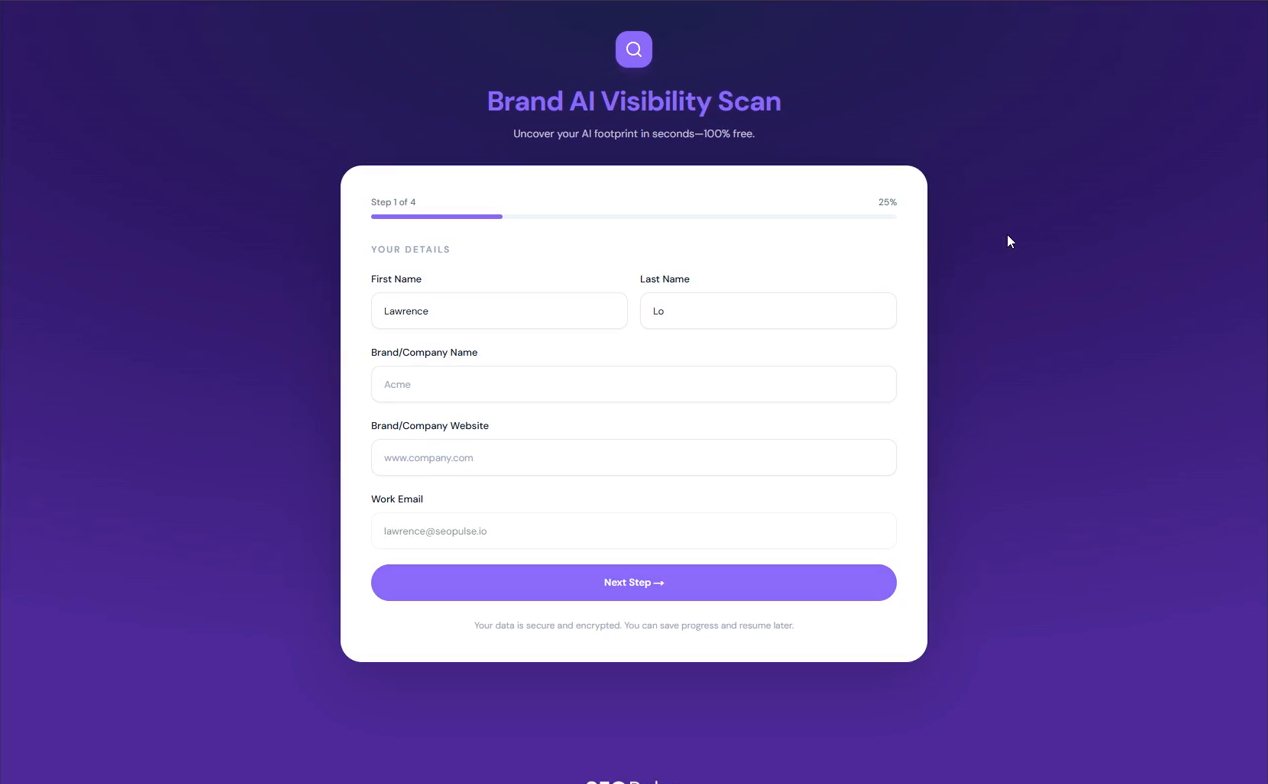
Can I test a client’s or prospect’s website? Yes. Enter any brand and website here. Agencies often use this to check a prospect before a pitch.
Screen 2: Choose your region
Pick the market where your customers are. AI answers change by location.

SEOPulse free brand scan, Screen 2. What to notice: you’re choosing where the AI answers are collected from, not where your business is registered.
Someone asking “best accounting firm for startups” in Singapore gets different recommendations from someone asking in London or Sydney.
Screen 3: Add up to 8 prompts
Prompts are the AI version of keywords: full questions your customers ask, not short phrases. Prioritise questions asked by people who are ready to buy.
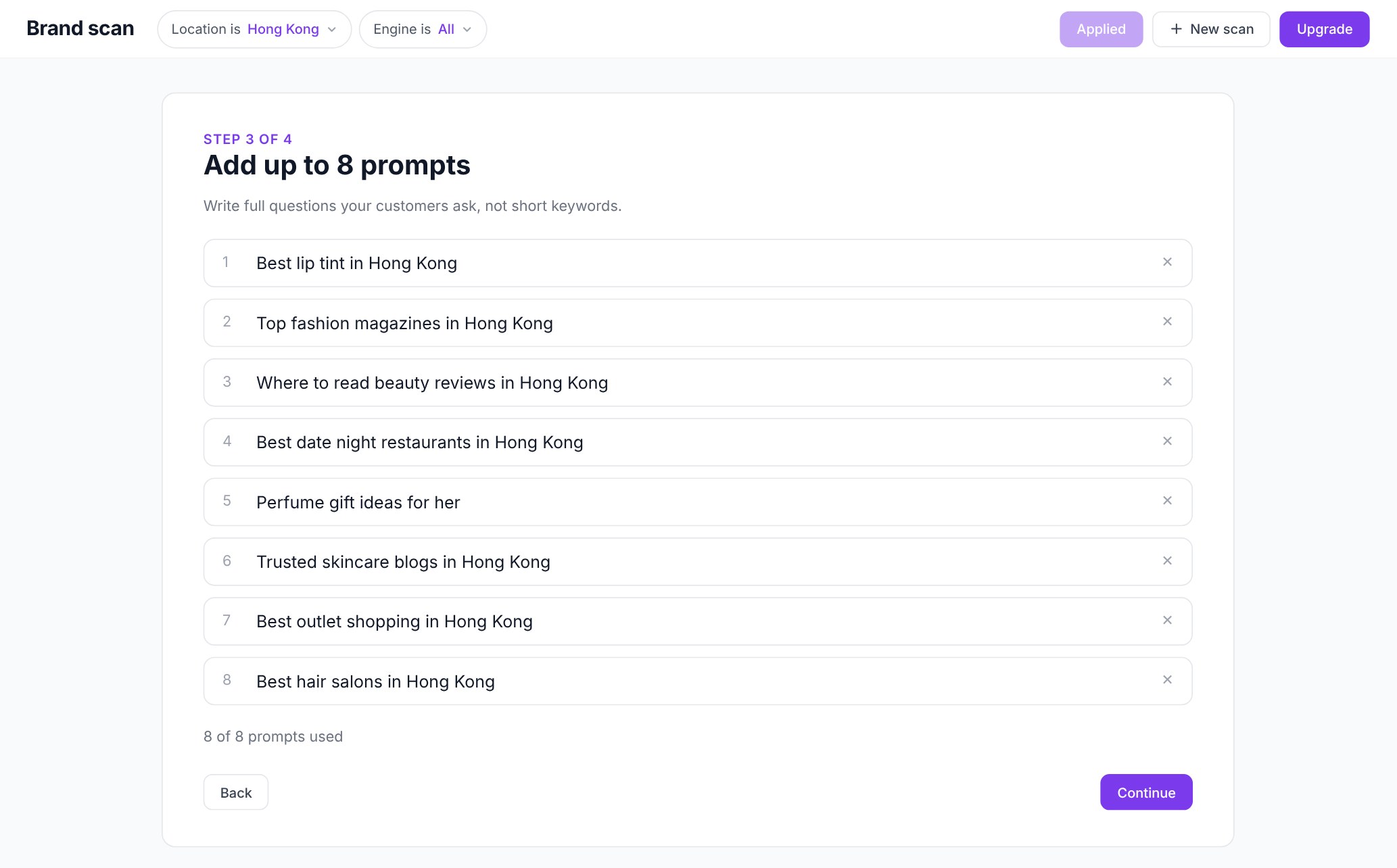
SEOPulse free brand scan, Screen 3. What to notice: each prompt is a complete question, written the way a real customer would ask it.
Instead of “commercial cleaning Brisbane”, you’d track “Who are the best commercial cleaning companies for offices in Brisbane?”
With only 8 slots, choose carefully:
1. Start with buying questions. These are questions where someone is choosing a provider:
- “What are the best [category] companies in [city]?”
- “Which [category] provider is best for [type of customer]?”
- “Is [your brand] worth the price?”
They’re harder to win, but they’re where your customers are. In our benchmark, company blogs supplied 23.4% of the sources AI cited for ready-to-buy questions, slightly more than the 20.8% for early-research questions. Blogs that compare and recommend get pulled into buying answers too.
2. Add one or two problem questions. These are questions customers ask before they know who to hire, like “How often should an office be professionally cleaned?”
3. Add real-life context. Real people add who they are (“for a small law firm”), their budget (“under $500 a month”) and their location (“in Hong Kong”). These details make prompts realistic, and they’re often where smaller brands can win.
4. Use questions you already have. Look at Google’s “People also ask” boxes, the questions your sales team hears every week, and the search terms in your Google Search Console.
| Prompt type | How many | Example |
|---|---|---|
| Buying question | 4–5 | Which accounting firm is best for startups in Singapore? |
| Problem question | 2 | When should a startup hire an accountant? |
| Brand question | 1 | Is [your brand] good for startups? |
For the full method, read our Prompt Matrix guide.
Screen 4: Add 3–5 competitors
Choose competitors with a strong digital presence: brands that already show up in AI answers and rank well on Google. Your offline rivals may not be your AI competitors.
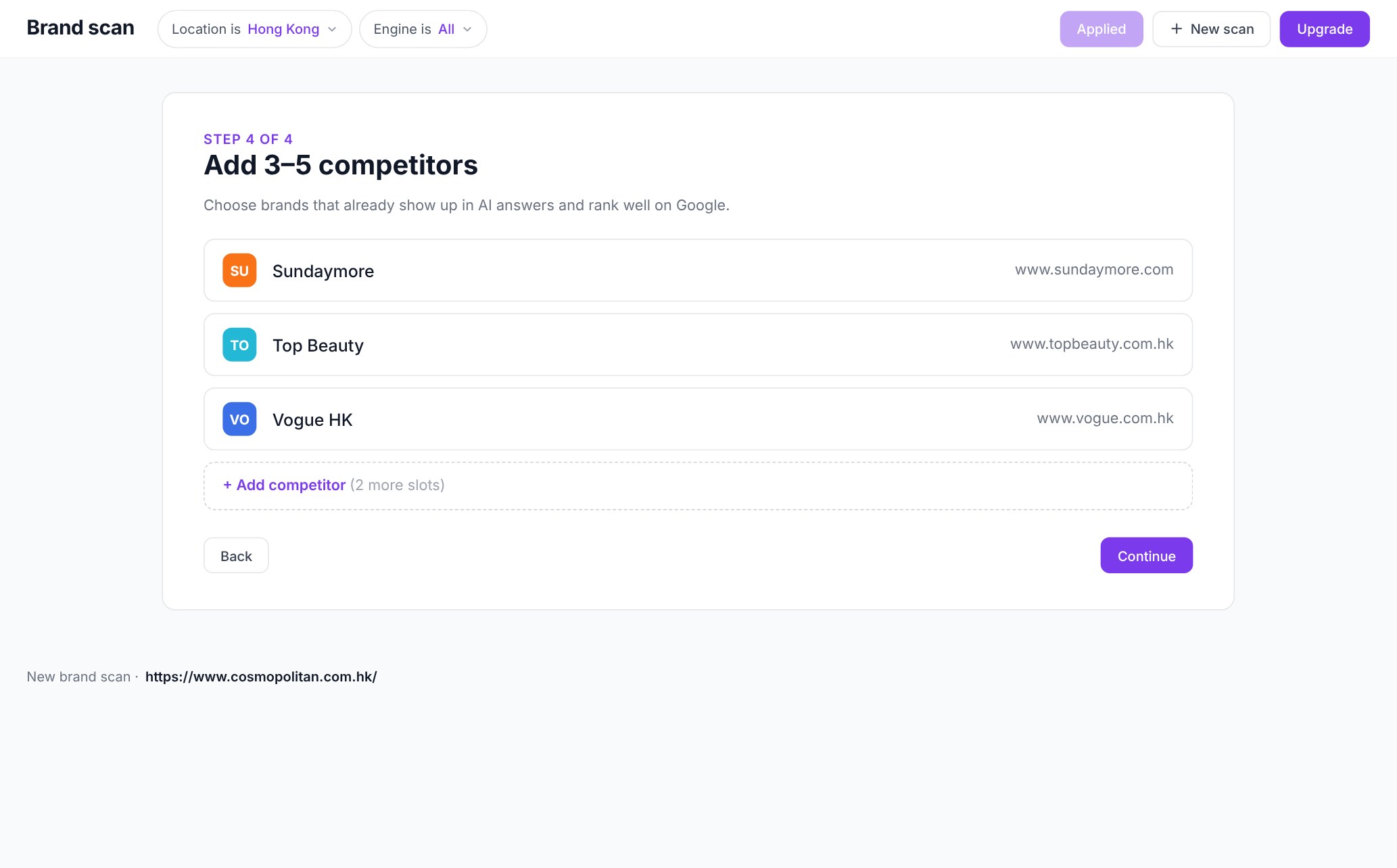
SEOPulse free brand scan, Screen 4. What to notice: you start with 3 slots and can add up to 5, so the competitors you choose decide what your share of voice is measured against.
This is where most people go wrong. The company you lose tenders to might have almost no online presence. To AI, it barely exists.
Here’s how to find the right competitors in about 15 minutes:
1. Ask AI first. Open ChatGPT, Perplexity and Gemini in a private browser window. Run 3–4 of your prompts and write down every brand that gets recommended. Any brand that appears on two or more engines is an AI competitor.
2. Check Google. Search your 2–3 most important service keywords in your target region. Note the businesses in the top 5 organic results. Skip directories, review sites, Reddit and media sites. They aren’t competitors; they’re sources AI pulls from, and they matter later.
3. Keep the overlap. Pick 3 to 5 brands that appear on both lists. If you have more than 5, choose the ones in the same region, offering the same service, and about your size or one step ahead.
Avoid:
- Offline rivals with weak websites. They’ll score 0% and tell you nothing.
- Giant platforms like Amazon or Booking.com, unless you really compete with them for the same customer.
A real example: a commercial cleaning company in Australia entered three competitors it knew from local tenders. One of them scored 0%, because AI never mentioned it. Meanwhile, the results showed four other cleaning brands that AI was recommending, and none of them were on the company’s list.
The lesson: after your first scan, check the visibility ranking for brands you didn’t enter. Those are your real AI competitors.
Submit the form, and your results will be ready a few minutes later.
How to read your results, section by section
Your results show your visibility score, who AI recommends instead, how you perform on each engine, and which sources AI trusts. Read them from top to bottom.
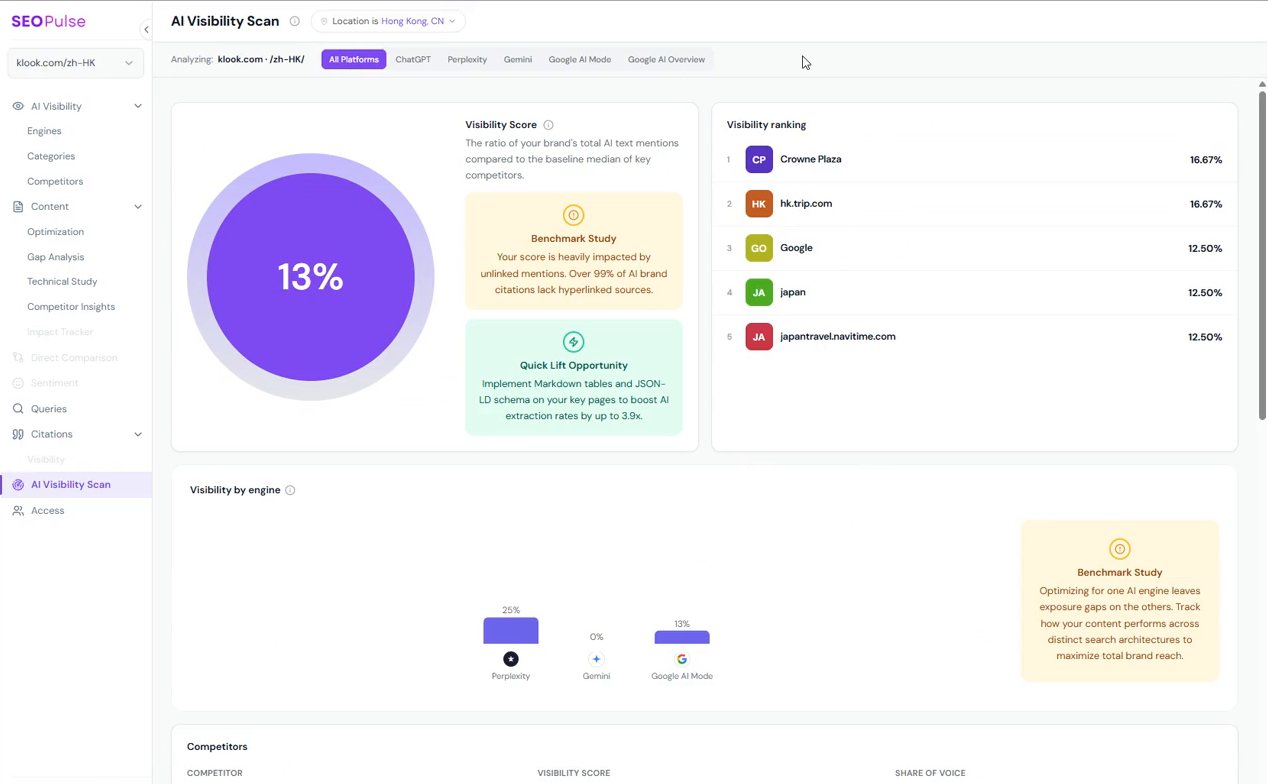
How to filter results by AI engine and region
At the top (as of October 2026), filter by All Platforms or by individual engines: ChatGPT, Perplexity, Gemini, Google AI Mode and Google AI Overviews. The location shows which region your scan ran in.
How to use it: start with All Platforms for the big picture, then click into each engine.
What your AI visibility score means
Your headline number shows how visible your brand is in the AI answers for your questions, compared with your competitors. In the free scan, it’s the ratio of your brand’s AI mentions to the median for your key competitors.
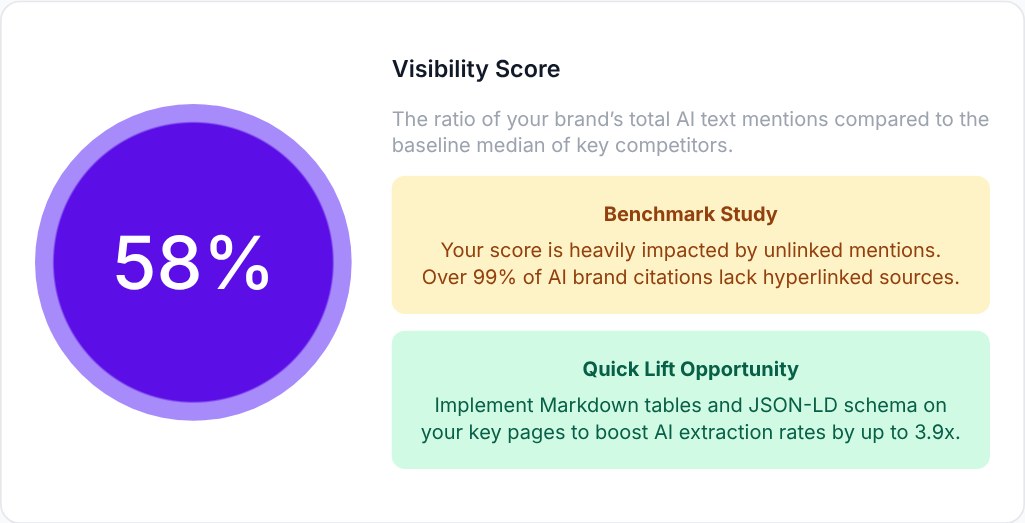
SEOPulse free brand scan. What to notice: the score and the two cards next to it. Benchmark Study gives context, and Quick Lift Opportunity suggests a first fix.
A low score doesn’t mean your SEO is bad. It means AI isn’t yet connecting your brand with the questions your customers ask.
One thing to know: the free scan calculates this score differently from a full SEOPulse report, so don’t compare the two directly.
Visibility ranking
This lists every brand or website AI mentions in your results, not just the competitors you entered.
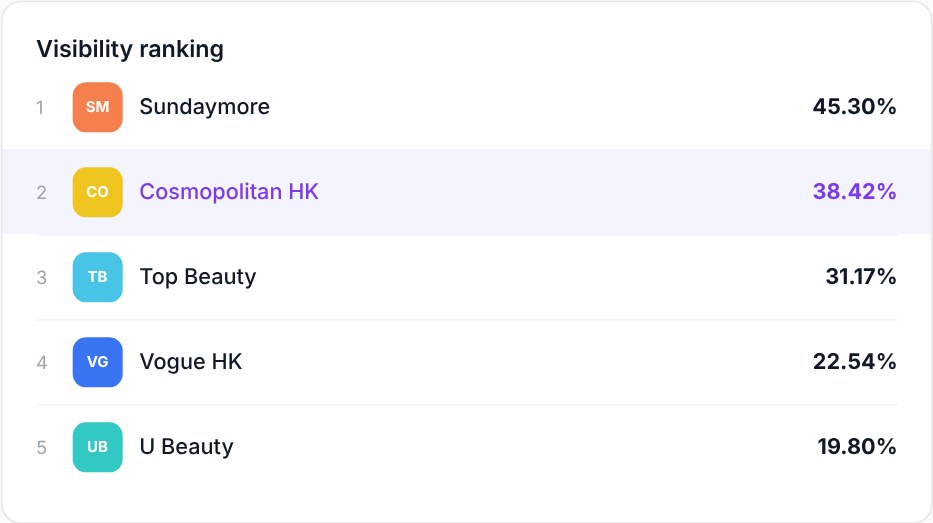
SEOPulse free brand scan. What to notice: names you didn’t enter. Directories, blogs and unexpected competitors often show up here.
This is who AI considers relevant for your questions.
How to use it: if brands you didn’t enter keep appearing, add them to your competitor list.
Visibility by engine
This chart shows your visibility on each AI engine. It’s normal to score well on one and 0% on another, because each engine trusts different sources.
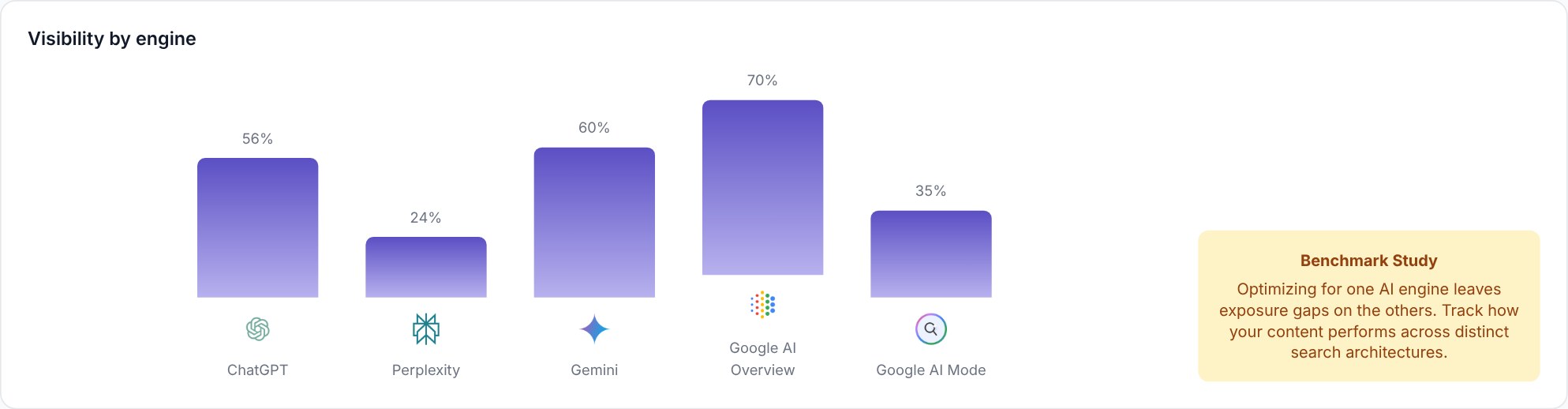
SEOPulse free brand scan. What to notice: the gaps between engines. One engine’s result doesn’t predict another’s.
In our October 2026 citation analysis:
| Engine | Most-cited sources |
|---|---|
| Google AI Overviews | LinkedIn, YouTube |
| Google AI Mode | YouTube, LinkedIn |
| Perplexity | Semrush, HubSpot Blog |
The top sources in your industry will be different, but the pattern holds.
How to use it: find the engine where you’re weakest. That’s where to focus next.
Competitors: visibility score vs share of voice
Visibility score compares brands across all AI answers. Share of voice compares them only within the competitors you entered.
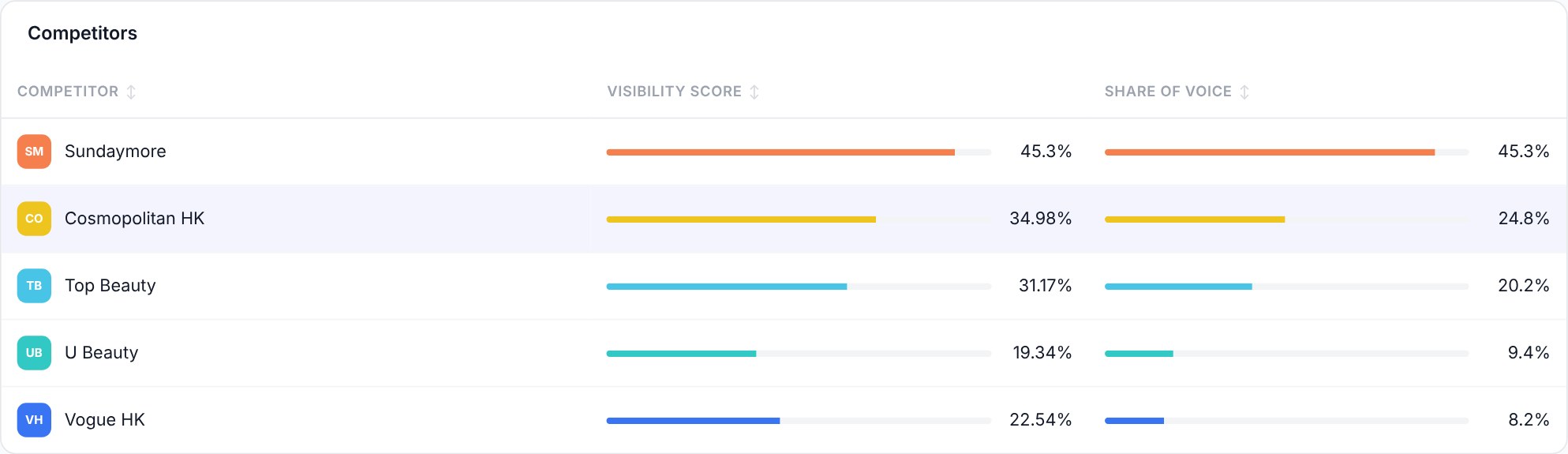
SEOPulse free brand scan. What to notice: the two columns. A competitor can have modest visibility but still own most of the share of voice in your group.
For example, if two competitors split all the mentions between them and you have none, they’ll each show 50% share of voice and you’ll show 0%.
How to use it: if one competitor dominates, look at what they publish and where they’re featured. That’s what AI is picking up.
Which websites AI cites for your questions
This shows which websites AI relies on to answer your questions, and how often your own site is one of them.

SEOPulse free brand scan. What to notice: your citation share. 0% means AI is answering questions about your industry using other people’s websites.
| Metric | What it tells you |
|---|---|
| Total domains cited | How many different websites AI used |
| Total sources cited | How many individual pages AI used |
| Citation share | How often your site is one of those sources. The scan shows two figures: your share of all citations, and the share of all answers that cite your site |
How to use it: directories, review sites and media outlets in your citations are outreach targets, not competitors. If AI keeps citing a particular site, getting listed or featured there is one of the fastest ways into AI answers.
Which questions you’re winning and missing
Each of your prompts shows its own visibility and sentiment, so you can see exactly which questions you’re winning and which you’re missing.
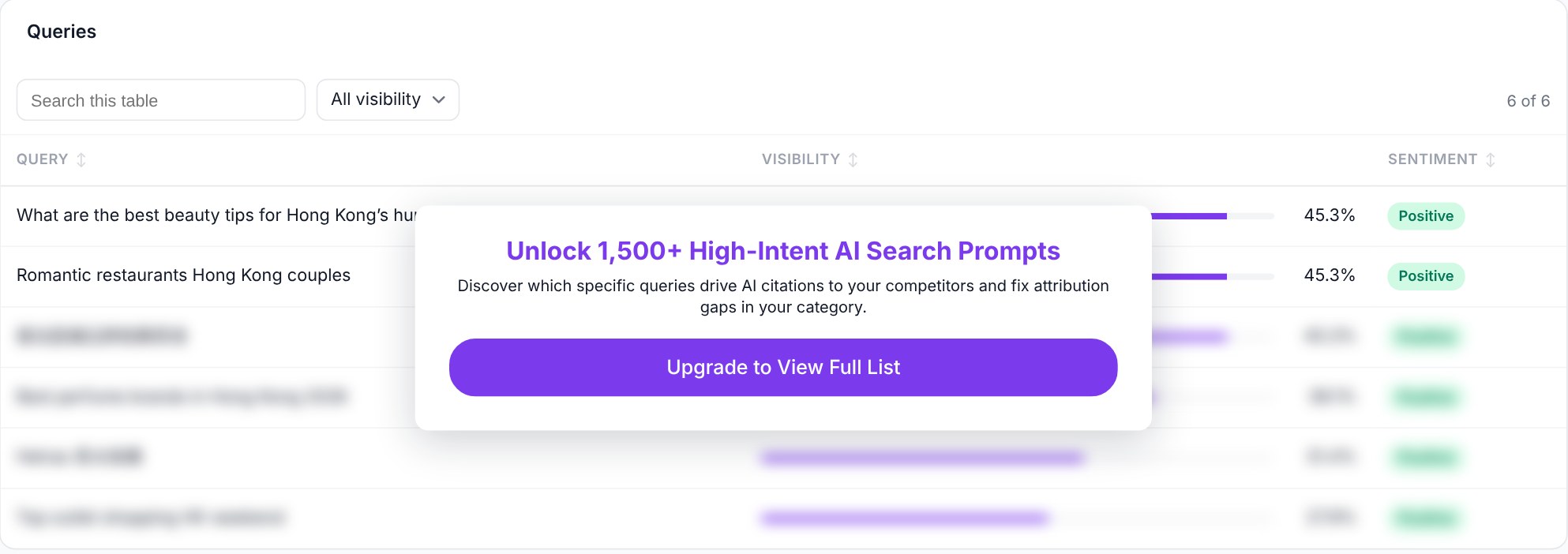
SEOPulse free brand scan. What to notice: the questions at 0%. Those are your gaps.
Sentiment shows whether AI describes your brand positively, neutrally or negatively when it does mention you.
How to use it: pick the one question that matters most to your business where you scored 0%. That’s your first priority.
Run your free SEOPulse brand scan and follow this guide to interpret your results.
Can AI bots read your website? A 5-minute DIY check
The free scan shows whether AI recommends you. It doesn’t check whether AI can read your site. You can do that yourself in about five minutes.
1. Check your robots.txt. Go to yourwebsite.com/robots.txt and look for lines that block AI bots:
- OAI-SearchBot, used for ChatGPT search
- PerplexityBot, used by Perplexity
If either one has Disallow: / underneath it, that engine may not be able to include your pages.
For Google AI Overviews and AI Mode, Google says a page must be indexed and eligible to show a snippet in Search. If your pages appear in Google search, you’ve met the basic requirement. It doesn’t guarantee inclusion.
2. Check your key pages show real text. Open an important page, like a service or pricing page. Right-click and choose View Page Source (or press Ctrl+U / Cmd+Option+U). Press Ctrl+F and search for a sentence you can see on the page.
If you can’t find it, your content probably loads with JavaScript, and some AI bots may not see it.
3. Check nothing blocks the page. Make sure key pages aren’t hidden behind logins, pop-ups that cover the content, or broken links.
If any check fails, fix it first. Good content can’t get cited if AI can’t read it. For the full technical checklist, see Step 3 of our Answer Engine Optimization Step by Step guide.
Why is my business on Google but missing in ChatGPT?
A low score usually comes down to one of three problems: AI can’t read your pages, you don’t answer the question, or AI trusts other websites more. Each one needs a different fix.
1. A technical problem: AI can’t read your pages
Signs: you score 0% on every engine, even for questions where your site has a strong answer.
Example: Tenfold AI, a legal tech company selling in Taiwan, started at 0% AI visibility because AI crawlers couldn’t read its content properly. Fixing access moved it to 1% at the start of its second month of tracking. That’s a small change, but it was the step that made everything after it possible.
What to do: run the DIY check above, and fix access issues before creating new content.
2. A content problem: you don’t answer the question
Signs: AI can read your site, but you don’t have a page that directly answers the question. Your competitors do.
Example: Tenfold AI, a legal tech company selling in Taiwan, then created and updated 10 pages targeted at the questions it was missing. Within 14 days of the pages going live, visibility rose to 7%, and its average position in AI answers moved from #50 to #28.
What to do: for each missed question, decide whether to refresh a page you already have (if it’s close) or create a new one (if nothing covers it). Put the answer near the top, in plain language. No one to write it? SEOPulse’s white-label content team can turn the gap into a finished, AI-ready page for you.
3. An outside-source problem: AI trusts other websites
Signs: your citations are full of directories, review sites, industry publications or forums, and you’re not on them.
What to do: get listed, reviewed or featured on the specific sites AI cites for your questions. Use the sources from your results, not a generic list of big publishers.
Good news for smaller brands: you don’t need a big website to get cited. In our October 2026 analysis of 9,779 citations, 34.2% went to pages with a Domain Authority under 25 and fewer than five backlinks. It’s an observation from that sample, not a promise, but it shows clear, useful answers can compete with bigger sites.
| Cause | Signs | First action |
|---|---|---|
| Technical | 0% everywhere, even where you have strong pages | Run the bot access check |
| Content | Competitors answer the question, you don’t | Refresh a page or create a new one |
| Outside sources | AI cites directories, reviews or media you’re not on | Get listed or featured on those sites |
How to turn your results into an action list
A score is only useful if it leads to action. Turn each finding into one task, with an owner and a date to re-check.
From our agency work, the most common question after a report is: “I’ve got this meaty report and I present it to the client. What do I do next?” This table is the answer.
| Finding | Which question or page | What to do | Who owns it | Re-check |
|---|---|---|---|---|
| 0% on every engine | All questions | Run the bot access check | Web developer | After the fix |
| Competitor cited, not you | “Best [category] in [city]” | Refresh the service page with a direct answer | Content team | 4 weeks |
| Directory cited 5+ times | Buying questions | Get listed on the directory | Marketing | 6 weeks |
| Invisible on one engine only | All questions | Check which sources that engine cites | SEO lead | 4 weeks |
Start with one row. Fix the biggest blocker first, then re-check. AI answers change often, so read results over several checks, not one.
How agencies can use the free scan with clients
Run the scan on a prospect’s brand before the meeting. Showing them that AI recommends three competitors and not them makes a stronger case than any slide about the future of search.
One content agency told us it wanted exactly this: “a tool to help justify our service to clients.”
Digital Zoo, an SEO and GEO agency, did exactly that. It pitched a regional insurance company with SEOPulse data showing how the brand appeared in AI answers next to its competitors, and won the account. The insurer now uses SEOPulse visibility metrics as its official performance KPIs.
Three tips:
- Present it alongside SEO, not instead of it. AI visibility builds on SEO foundations. Position it as an extra layer of reporting your clients don’t have yet.
- Bring the action list, not just the score. Clients want to know what happens next. A simple action list of finding, page, task, owner and re-check date gives them one.
- Keep visibility and revenue separate. AI visibility shows whether a brand is being recommended. It isn’t a direct measure of leads or sales.
Free scan or full report: when do you need more?
SEOPulse’s free brand scan is a one-off snapshot of a few questions. A full report is for tracking many questions, markets and engines over time.
| Free brand scan | Full SEOPulse report | |
|---|---|---|
| Questions | Up to 8 | 25 to 250 on standard plans (more on Custom), grouped by category |
| Competitors | 3–5 | No limit on any plan |
| History | One snapshot | Daily tracking |
| What you see | Score, ranking, engines, competitors, citations, queries | Everything in the scan, plus full AI answers, cited URLs, gap analysis, content briefs and impact tracking |
| Cost | Free, one per email | From US$49 a month (Starter: 25 prompts) |
Request an SEOPulse demo for ongoing tracking →
Haven’t run your free scan yet? Check your brand now
Frequently asked questions
Yes. SEOPulse’s Brand AI Visibility Scan is free, with one scan per work email address. It checks 5 to 8 questions against 3 to 5 competitors in the region you choose.
Yes. Enter any brand and website on Screen 1 of SEOPulse’s free scan. Agencies often use the scan to check a prospect’s visibility before a pitch.
SEOPulse’s free scan splits results by engine, so you can compare your visibility on ChatGPT, Perplexity, Gemini, Google AI Mode and Google AI Overviews. Coverage in the free scan may differ from the full platform.
SEOPulse collects answers by capturing live answers from each AI interface, as a user in the market you choose, rather than relying on API responses, so results are close to what local buyers see. Answers still vary from run to run, so treat a single scan as a snapshot.
Rank trackers show where a page appears in a list of search results. AI visibility checkers show whether your brand is mentioned or cited inside an AI-generated answer. You need both: SEO gets your pages found, and AI visibility shows whether AI uses them.
A mention is when AI names your brand. A citation is when AI links to your website as a source. You can have one without the other, so track both.
Check the citation share in your SEOPulse scan results. If it’s 0%, none of your pages are being used as sources for those questions yet. A full report shows the exact URLs AI cites for each question.
Refresh a page if it already serves the buyer’s question. Create a new page when the buyer need is distinct and nothing on your site covers it.
AI answers change from day to day. Compare several checks before drawing conclusions.
Start with one scan and one fix
Run the free scan. Find the one question that matters most where you scored 0%. Work out whether it’s a technical, content or outside-source problem, fix it, and re-check.
For the next steps after your scan, read Answer Engine Optimization Step by Step: From AI Visibility Report to Action. For a full campaign plan, see Generative Engine Optimization: A 90-Day Plan for Agencies.
Sources
- SEOPulse, GEO & AI Search Benchmark: 755 buyer prompts and 6,811 AI answers across ChatGPT, Perplexity, Gemini, Google AI Overviews and Google AI Mode; data collected 16 August 2026
- SEOPulse, Citation Analysis, October 2026: 9,779 citations across 50 buyer and search queries
- SEOPulse, Tenfold AI case study (client-reported)
- SEOPulse free brand scan, anonymised client example, October 2026
- Google Search Central: AI features and your website
- OpenAI: Overview of OpenAI crawlers
- Perplexity: Perplexity crawlers
- Quotes from SEOPulse conversations with agency partners, 2026
A tech lead with more than ten years of engineering leadership, scaling high-load systems and running technical audits. Tom architected the SEOPulse engine: the data pipelines that collect AI answers as real users see them and turn citations into clear next steps.
Jessica leads content at SEOPulse: product-led content, SEO strategy, AI citation strategy and thought leadership.