
Best Otterly Alternatives in 2026: 5 Tools Compared
Thinking of leaving Otterly? Compare 5 alternatives by engine coverage, pricing and the cons real users report, then run a fair pilot before you switch.
alternatives in 2026
Otterly is a good tool. It’s affordable, quick to set up, and it taught a lot of agencies what AI visibility even means. One user testing it called it “pretty clear and easy to use. Definitely more structured than just screenshotting results.”
Agencies don’t usually leave Otterly because it’s bad. They leave because their needs have grown.
A client wants Gemini covered without paying for an add-on. The team needs Traditional Chinese, Japanese or Korean prompts tracked properly. Or the client has seen the report and is asking the question we hear a lot:
“How do we turn AI search visibility reports into action plans and ROI for B2B clients?”
The five alternatives below differ most on engine coverage, client reporting and how quickly they get you from a report to a content brief. Each one also has cons that real users report, and a way to test it before you commit.
Why do agencies look for an Otterly alternative?

Agencies usually leave Otterly for four reasons: engines that cost extra, price jumps between tiers, insights that don’t turn into actions, and smaller frustrations that add up across clients. Each one comes up repeatedly in public user reviews.
1. Engines cost extra
Otterly includes ChatGPT, Google AI Overviews, Perplexity and Microsoft Copilot on every plan. Google AI Mode, Gemini and Claude are paid add-ons. On the Premium plan, AI Mode and Gemini cost an extra $149/month each, and Claude costs $439/month.
That matters more than it sounds. In SEOPulse’s August 2026 benchmark of 6,811 AI answers across five engines in Hong Kong and Singapore, the engines picked the same top vendor just 1.5% of the time. If your client’s buyers use Gemini, a report without Gemini only shows you part of what they see.
2. The price jumps between tiers
Plans run from $29/month for 15 prompts, to $189 for 100, to $489 for 400.
One SEM specialist on G2 wrote: “The jump to €189/month for the Standard tier feels like a bit of a stretch” (June 2026). Two mid-sized companies said they had to defend the cost internally before buying.
3. Insights don’t always lead to actions
A content strategist on G2 said “it’s not always clear what specific actions should be taken based on the findings” (June 2026).
On Reddit in October 2026, a current Otterly user was blunter about the content suggestions: “Listicle after listicle, competitive article after competitive article. Just useless ideas chasing prompt after prompt.”
4. Smaller frustrations add up across clients
G2 reviewers mention:
- Sentiment scoring that’s “hyper-sensitive”
- Data that takes a while to populate
- An interface that “can feel cluttered when you have a lot of prompts and tracks going”
One reviewer in a niche industry said “the amount of data can be limited.”
Should you stay with Otterly?
It’s still a sensible choice if:
- Your clients mostly need the four included engines
- Budgets are small
- Your team already uses it every week
One user said Otterly’s insights “shaped how I plan episodes, choose guests, and refine story angles.” That’s the kind of everyday use that’s worth keeping.
As one agency leader told us: “they pay for it. They don’t use it.” A tool your team actually uses beats a better one they ignore.
Otterly alternatives compared at a glance
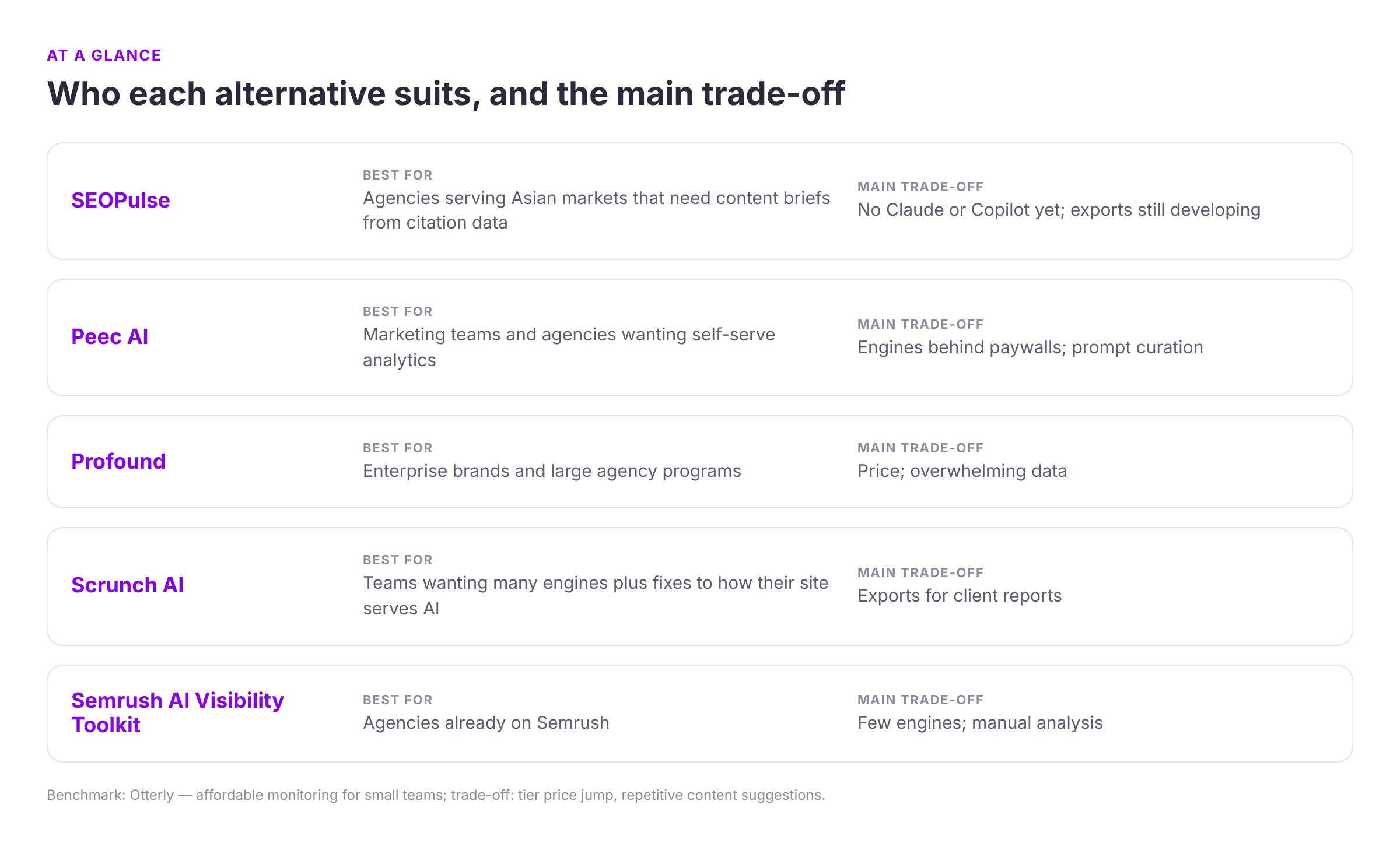
| Otterly (benchmark) | SEOPulse | Peec AI | Profound | Scrunch AI | Semrush AI Visibility Toolkit | |
|---|---|---|---|---|---|---|
| Best for | Affordable monitoring for small teams | Agencies serving Asian markets that need content briefs from citation data, across languages | Self-serve analytics for marketing teams and agencies | Enterprise brands and large agency programs | Teams wanting many engines plus fixes to how their site serves AI | Agencies already on Semrush |
| Engines | ChatGPT, AI Overviews, Perplexity, Copilot; AI Mode, Gemini and Claude cost extra | ChatGPT, Perplexity, Gemini, Google AI Overviews, Google AI Mode; DeepSeek, Qwen, Kimi and ERNIE with the Chinese LLM pack (US$3 per prompt) | Choose 3 from ChatGPT, AI Mode, AI Overviews, Copilot, Gemini, Naver AI; more cost extra | Up to 9 on Enterprise, including Claude, Copilot and DeepSeek | ChatGPT, Claude, Gemini, Perplexity, AI Mode, AI Overviews, Meta | ChatGPT and Google AI Mode |
| Prompts | 15 / 100 / 400 | 25 / 100 / 250 (Starter / Pro / Agency); Custom above 1,000; Agency covers up to 10 client workspaces | 50 / 150 / 350 | Custom; agency plan uses credits | 350 / 700 | 25 (50–200 with Semrush One) |
| Markets and languages | 50+ countries | Asia-first: any market and language, including Chinese, Japanese and Korean; answers collected as a real user in that location | Any supported country or language at no extra cost | Custom on Enterprise | Not listed on pricing page | Regional or worldwide views |
| Exports and reporting | Exports; Looker Studio and API from Standard | Table-by-table downloads; view-only client sharing of a workspace; full data export in development | CSV, Looker Studio, MCP; API on Enterprise | CSV/JSON and API on Enterprise | Integrations; Data API on Enterprise | Inside Semrush |
| Starting price | $29/month | Free brand scan; Starter US$49/month; Agency US$299/month | From $80/month (billed annually) | Custom | $300/month ($250 billed annually) | $99/month |
| Trial | Free trial | Free self-serve brand scan | Free trial | 7 days, 50 fixed prompts | 7 days, no card | None |
| Top cons | Tier price jump; repetitive content suggestions | No Claude or Copilot yet; exports still developing | Engines behind paywalls; prompt curation | Price; overwhelming data | Exports for client reports | Few engines; manual analysis |
Pricing and features taken from each vendor’s official pricing page on 10 October 2026. These change often, so recheck before you buy.
Comparing prices fairly: a monthly fee only means something next to the workload it covers. Price the same job in every tool: the same prompts, engines, markets and seats. A $99 plan covering two engines isn’t cheaper than a $250 plan covering seven if your client needs all seven.
The five alternatives: who each suits, and what users flag
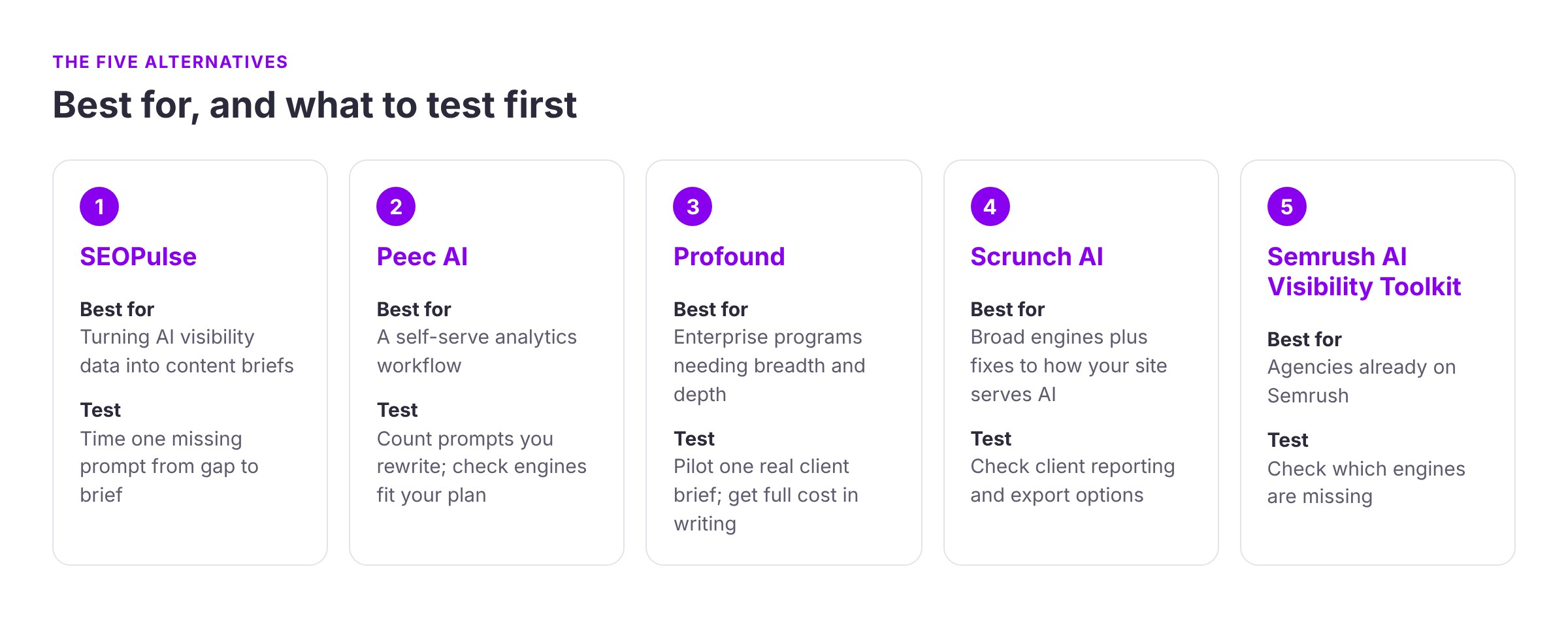
1. SEOPulse: best for turning AI visibility data into content briefs
Best for: agencies whose clients keep asking “what next?”, especially agencies serving clients across Asia, in more than one market or language.
Why agencies switch to it:
- The step after monitoring. SEOPulse started life as a content audit tool, so it goes further than tracking. For every tracked prompt, you see the full AI answer, the exact pages it cited and which competitors appeared.
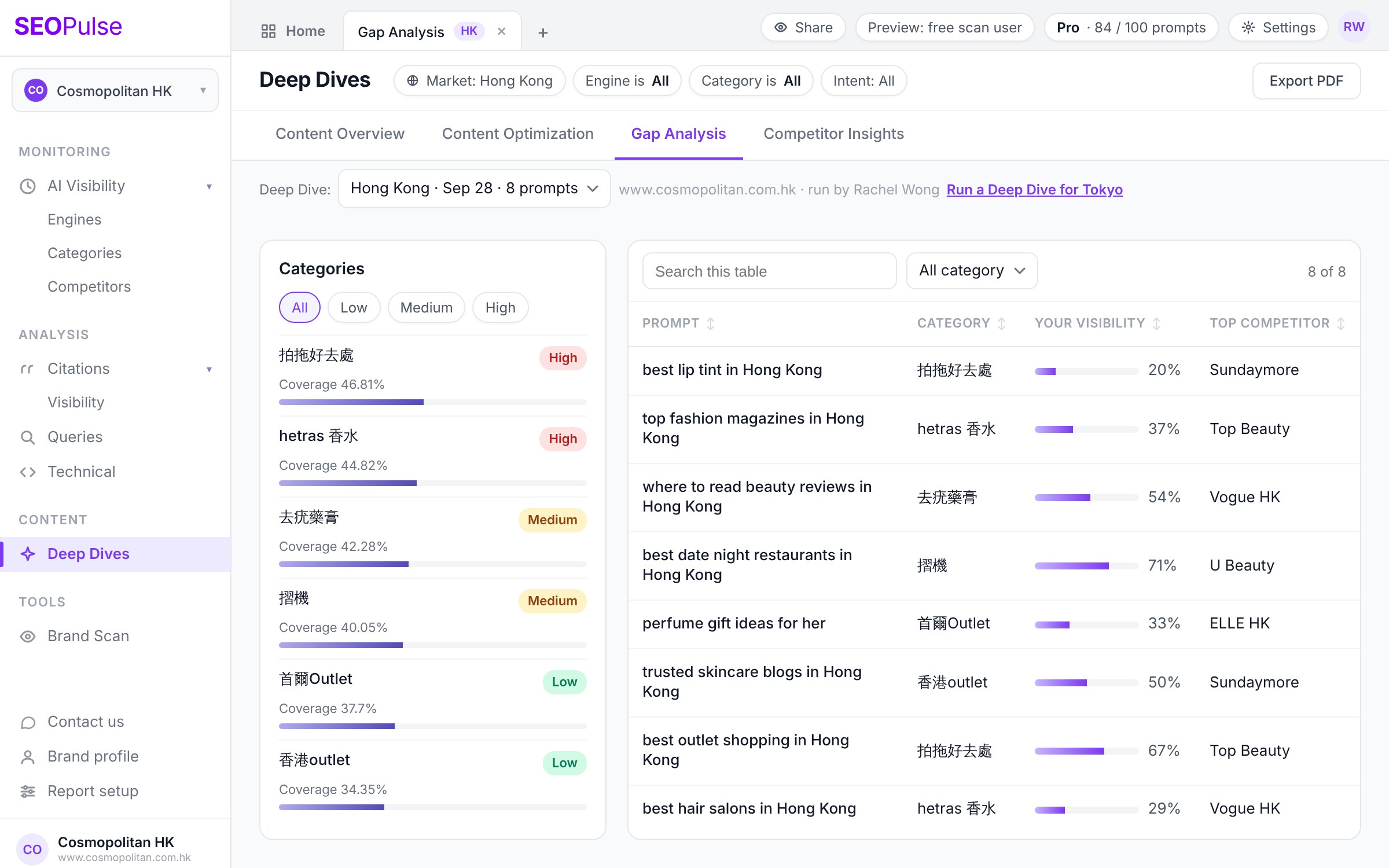
- Gap analysis that feeds the brief. For each prompt where your client is missing, you get:
- the pages AI cites instead
- their headings, keywords and number of content sections
- their use of images, video, tables and schema
- a “permission to win” view, based on the cited pages’ authority and backlinks, which shows how realistic the prompt is for your client to win
- Answers from real users, not API approximations. Answers are collected by simulating real users in the market you choose, across Asia-Pacific markets such as Hong Kong, Singapore, Japan, Korea and Taiwan, with full support for Chinese, Japanese and Korean prompts. API results can differ from what a local user actually sees.
- Hidden-gem sources. The citations view labels each source as third party, competitor or brand-owned, and surfaces smaller sites that are easier to pitch than the big names.
- Flexible ways to start. There’s a free self-serve brand scan for a quick snapshot and self-serve plans from US$49/month (Starter, 25 prompts) to US$299/month (Agency: 250 prompts across up to 10 client workspaces, with view-only sharing for clients). Deep Dives cost US$2 per prompt on any plan.
- White-label content. If the bottleneck is writers, SEOPulse’s content team turns Deep Dive briefs into finished, AI-ready pages (answer-first structure, FAQ schema, localisation into Asian languages), delivered unbranded so you can hand them to clients as your own.
The trade-offs:
- Five engines today. Claude and Copilot are on the roadmap but not live yet.
- Exports are still developing. You can download data table by table, but a full data export is still in development.
- Fewer public reviews. SEOPulse is newer, so there’s less independent feedback to read than for the bigger names. The first agency case study, Digital Zoo, grew its tracked prompts 5x in two months, and says its clients chose SEOPulse for ease of use and cost.
Try SEOPulse’s free brand scan on a client’s brand before choosing your next AI visibility tool.
Then take one prompt your client is missing from, and time how long it takes to get from the gap to a brief your writers could start on.
2. Peec AI: best for a self-serve analytics workflow
Best for: marketing teams and agencies that want a dedicated AI search analytics tool their analysts can start using quickly.
Why agencies switch to it:
- Plans and pricing: every prompt is tracked daily, every plan includes unlimited users, and tracking extra countries and languages costs nothing more.
- Agency features: bundles let you share prompts across client projects.
- Research: one user who tried both said “I tried Otterly and really liked it but found that Peec AI was better for research.”
- Reporting: another uses it to “spin up custom reports — simple or complex — without exporting CSVs and rebuilding dashboards.”
What users flag:
- Engines behind paywalls. Starter, Pro and Advanced each let you choose three engines. An enterprise reviewer on G2 named “the subscription wall between seeing all AI models” as their main dislike (August 2026). A three-month hands-on review found that “multi-platform tracking can get expensive.”
- Prompt curation takes work. One LinkedIn user said Peec “does what it says but you need to put effort into curating the tracked prompts.” A G2 reviewer found “40% of the prompts were overlapping.”
- Analysis can be manual. A head of organic strategy said “the gold often comes from exports and lots of manual filtering” (March 2026). Others still rely on Semrush for prompt volume.
- Doubts about the recommendations. “I don’t trust it yet on the recommendations will truly move the needle” (G2, August 2026).
- History starts when you start tracking. You can’t look back before your first day in the tool.
What to test: set up your real client prompts and count how many you have to rewrite or remove. Then check that the engines your client needs fit within your plan.
3. Profound: best for enterprise programs that need breadth and depth
Best for: enterprise brands and larger agency teams with big budgets, several markets and complex reporting.
Why agencies switch to it:
- Coverage and data: Enterprise covers up to nine engines, including Claude, Copilot and DeepSeek, with custom languages and regions and full data history.
- Exports: CSV/JSON exports and API access are included.
- Content workflows: Profound adds AI agents and content workflows.
- Agency plan: agencies can use a self-serve Agency Growth plan priced in credits per client workspace.
One Reddit reviewer called it “very comprehensive, particularly around citations, visibility and understanding how AI systems talk about a brand.”
What users flag:
- Price is the most common complaint by far. The same Reddit reviewer added: “The downside is obvious: it’s expensive.” On G2, reviewers call it “one of the most expensive tools on the market” (May 2026). Another says it’s “very expensive and complex, which can make it hard for smaller businesses” (September 2026).
- Too much data to digest. “My main complaint is the sheer volume of data” (G2, October 2026). On LinkedIn, one tester found the interface “a bit clunky/overwhelming at first.” A Reddit user who tested 12+ tools put it more bluntly: “Profound and Otterly were just too confusing for me.”
- Hard to test properly. The current trial runs 50 fixed prompts for seven days, so you can’t test your client’s real prompts before you pay.
- Reporting limits. Reviewers want more customization, better exports and more frequent data updates.
What to test: ask for a pilot on one real client brief. Time how long your analyst takes to get from the dashboard to a usable recommendation, and get the full cost in writing.
4. Scrunch AI: best for broad engine coverage plus fixes to how your site serves AI
Best for: teams that want to measure AI visibility and fix how their site is delivered to AI agents in the same place.
Why agencies switch to it:
- Engines: all plans cover seven engines, including Claude and Meta, so there are no engine add-ons.
- Page audits: plans include page audits with suggested fixes.
- AXP: Scrunch’s Agent Experience Platform creates an AI-friendly version of your site.
- Source detail: an agency that compared it with Profound on Reddit said Scrunch let them “see which exact pieces of content LLMs were pulling from.” Another user replied that Profound shows this too, so test both.
What users flag:
- Client reporting is the clearest pain point for agencies. One G2 reviewer said some features “don’t support exporting, which limits our ability to deliver that information directly to our clients.” Another said: “Right now, we screenshot them to include in reports.”
- Models locked behind higher tiers. “Certain models are locked behind higher tiers, which wasn’t made clear upfront” (G2, April 2026).
- Price for small teams. “It is pretty expensive right now,” said one small agency. Another reviewer asked for “a lighter plan for solo folks.”
- Accuracy and setup:
- An enterprise reviewer said: “Sometimes the system says we are not mentioned but our brands are in the results.”
- Others mention needing four weeks of data before you have a baseline.
- Connecting the agent traffic tool to clients’ CMSs was “difficult.”
- AXP needs serious setup. In a post sponsored by Scrunch, a tester noted that “the full bot-serving layer is enterprise-only and needs a CDN setup.”
What to test: build the client report you’d actually send each month. If you end up screenshotting the dashboard, count that time into the real cost.
5. Semrush AI Visibility Toolkit: best for agencies already on Semrush
Best for: agencies whose SEO team already works in Semrush every day.
Why agencies switch to it: your team doesn’t have to learn a new tool. One Reddit user who tested 12+ tools chose Semrush because “I was already using Semrush for SEO reporting so it made the most sense.”
Setup is quick too. A Semrush partner said the tool “just asked for my URL and populated everything.”
What users flag:
- Narrow engine coverage. Prompt tracking covers ChatGPT and Google AI Mode only. A client whose buyers use Perplexity or Gemini will need a second tool.
- Turning data into tactics takes manual work. A Reddit user who tried an earlier version of the add-on said they “have to manually extract data to make something useful for tactics.” A hands-on reviewer said the recommendations “feel broad and could apply to many businesses.”
- Questions about historical data. In June 2026, a Reddit user said that when they reran a historical report, “Same period, different export date, entirely different output.” That’s one user’s account, not a confirmed widespread problem. It’s still worth asking about, because client reporting depends on past numbers staying the same.
- Small allowance and add-on costs. The $99 toolkit includes 25 tracked prompts and has no free trial. Semrush reviewers often mention “additional costly add-ons.”
What to test: check whether two engines and your prompt allowance cover your clients’ actual buying journeys. Then rerun an old report to see if the numbers hold.
Can you prove the numbers? The question that decides most switches
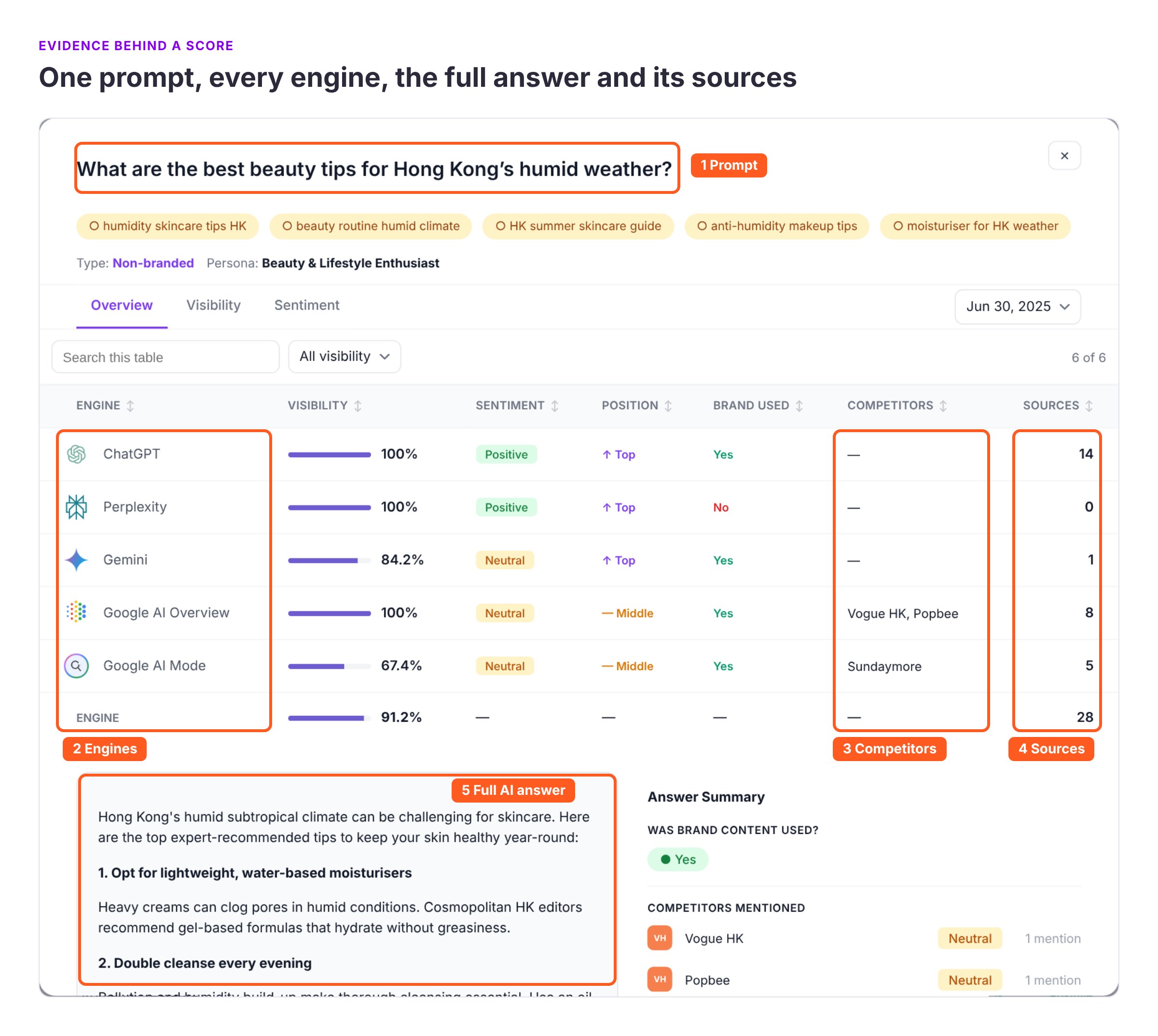
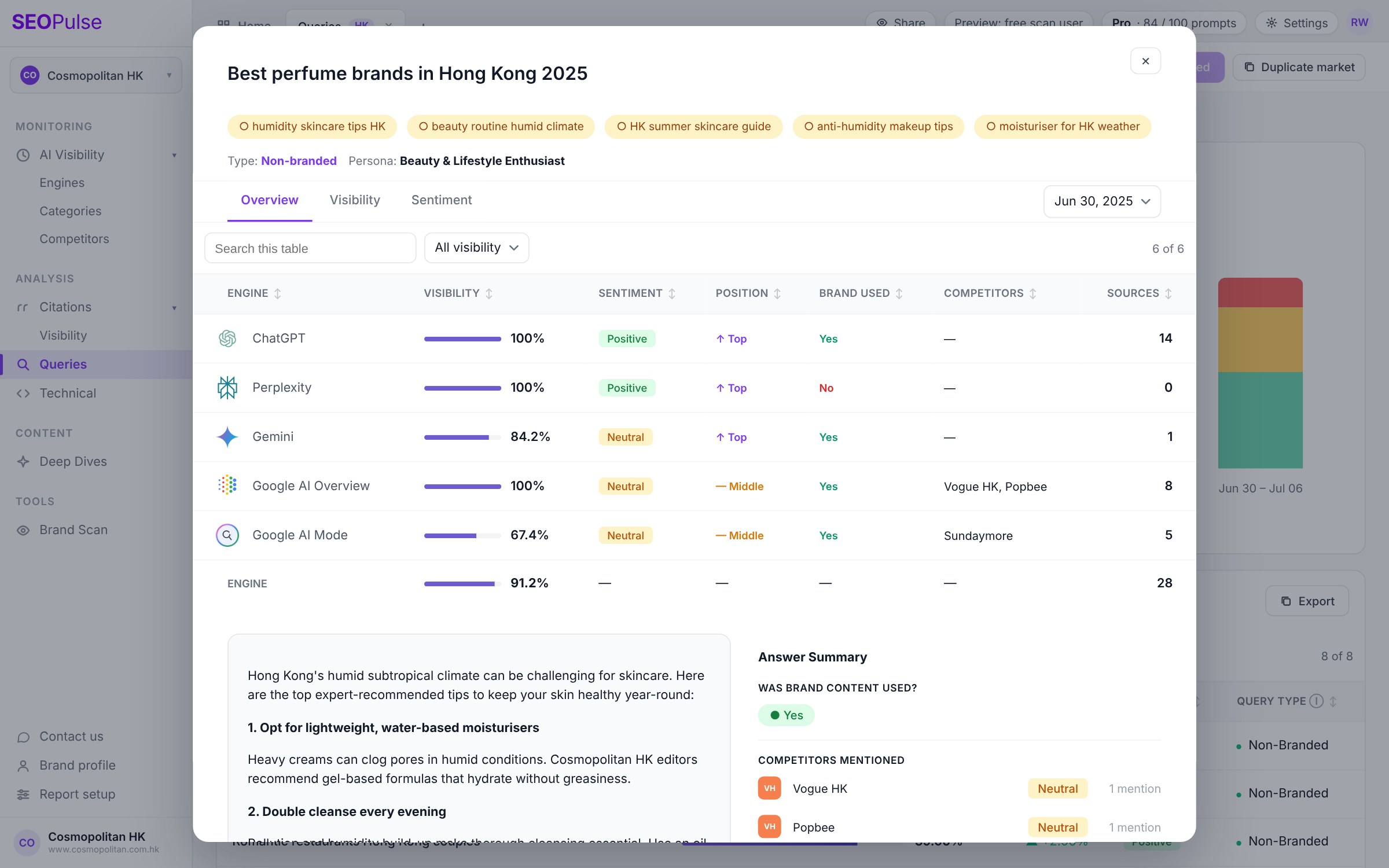
The tool you switch to should show the full AI answer, how it was collected and the cited URLs behind every score. Sooner or later, a client will check ChatGPT on their phone, see something different from your report, and ask why.
In 2026, an agency user posted on Reddit that their client thought they were “making up numbers.” The CEO had typed a prompt into ChatGPT on his phone and didn’t see the brand the dashboard said was visible. The agency liked the tool’s interface but wrote: “if I can’t prove the results are real, I’ll simply lose this contract.”
The vendor replied in the thread that its data comes from browser-level simulation of real users, and that API data is available on request. We can’t say who was right. But the problem is common.
A brand adviser we spoke with described the same feeling about AI visibility reports in general: “Sometimes I look at two, and sometimes I’m not sure who’s right.”
AI answers change from run to run, from market to market, and between engines. One person checking on their phone sees one answer at one moment. A tool samples many answers, so the two will rarely match exactly.
So the tool you switch to needs to let you show your working. Ask every vendor:
- Can I see the full AI answer behind every score, not just the percentage?
- How are answers collected? API calls, browser simulation or real user sessions? From which country?
- Do you track mentions and citations separately? In SEOPulse’s benchmark, 53.4% of answers mentioned a tracked brand, 34.2% cited its website, and only 10.0% did both. A combined score can hide which one is moving.
- Do historical reports stay the same when I rerun them?
- How often is the data refreshed, and how far back can my client see?
If a tool can’t answer these clearly, your client conversations will get harder, not easier.
The real test: can you get from a report to a content brief?
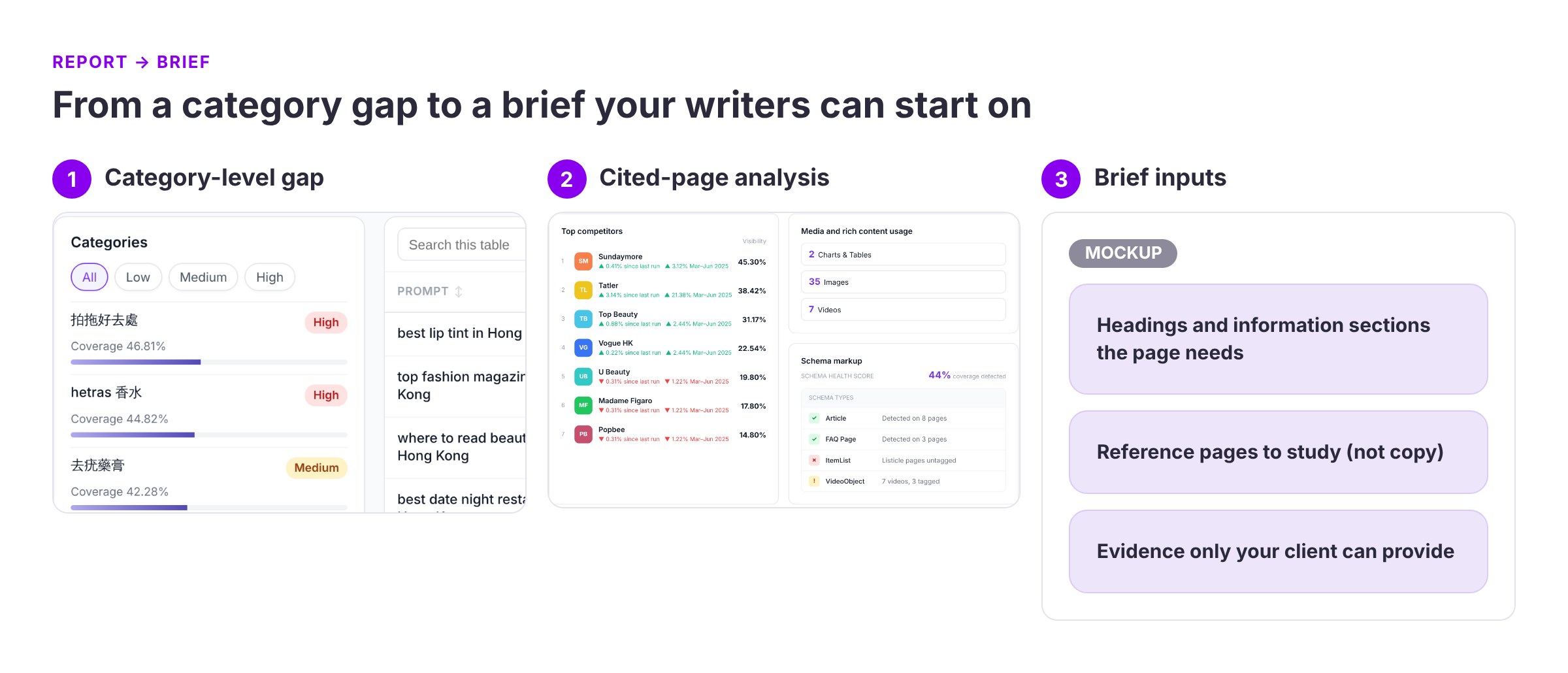
Most tools answer the question “how visible are we?” The switching question is whether a tool helps your team decide what to create next.
Here’s the workflow we’d test in every tool on your shortlist. It’s how one influencer marketing agency in Hong Kong worked through its first AI visibility report with us.
- 1Filter by category, not the overall average. The agency was visible in 11% of answers across 22 Hong Kong prompts. That number hid the real story. They were strong on one broad “top agency” question and absent on specific ones about nano, micro and lifestyle influencers. As they put it: “The overall average doesn’t mean much, but the category average is more meaningful.”

- 2Find the prompts where you’re absent. These are your gaps. Group the prompts that serve the same buyer need.
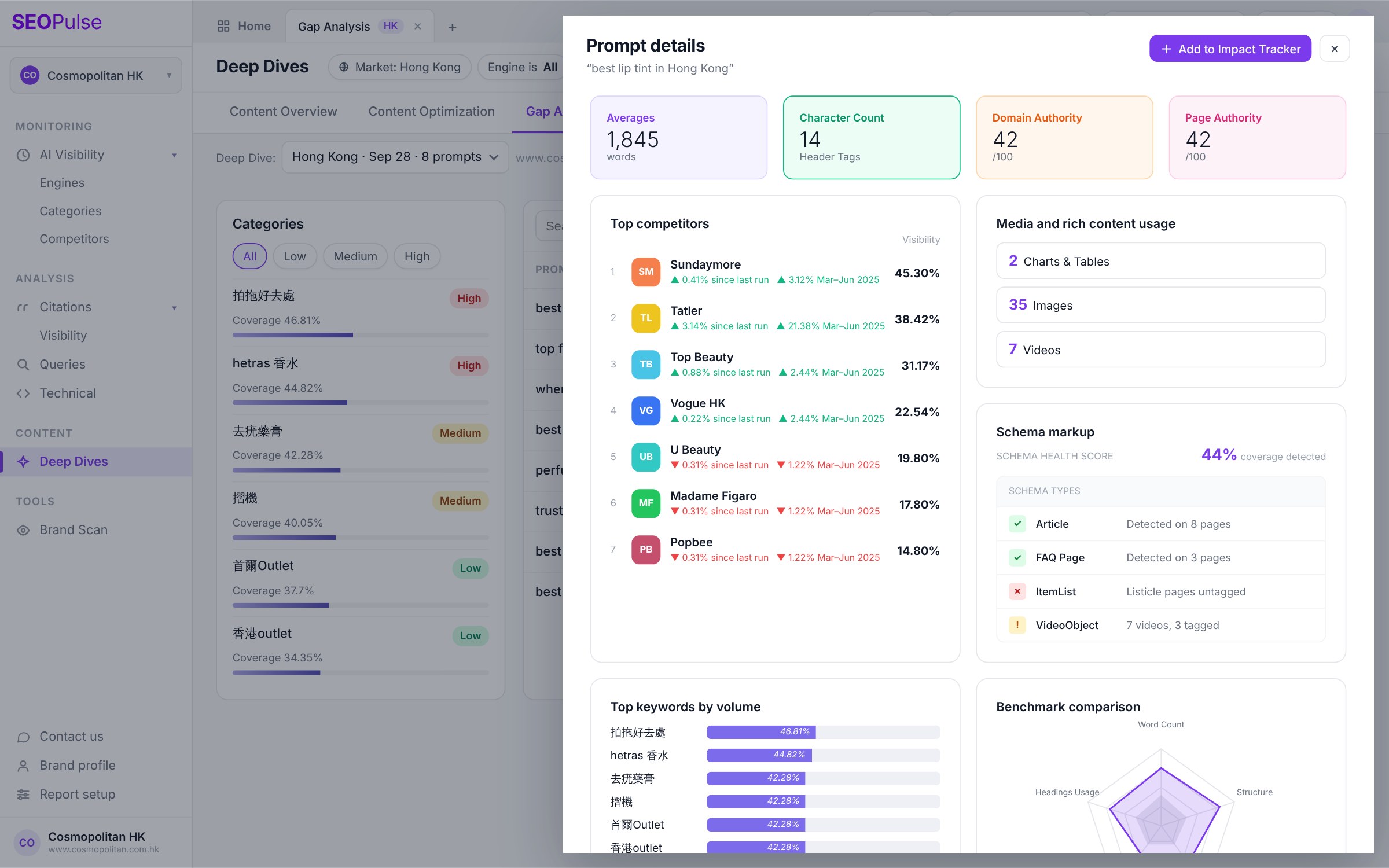
- 3Judge your chances before you write. Look at the pages AI cites for each gap. If they’re on huge domains with thousands of backlinks, a newer brand may want to start elsewhere. If Reddit or YouTube dominate, the opportunity may be there instead.
Smaller sites do get cited. In SEOPulse’s October 2026 analysis of 9,779 citations, 34.2% went to pages with Domain Authority under 25 and fewer than five backlinks. That share was 44.8% on Gemini and 26.9% on Google AI Mode.
- 4Read the actual answers. Note what information AI pulls, which sources it trusts, and how the cited pages are structured. In the same analysis, about one in three cited pages included a data table.
- 5Write the brief. Include headings, the information sections the page needs, reference pages to study (not copy), and the evidence only your client can provide.
The agency came out with two clear actions:
- Refresh their outdated Xiaohongshu (Little Red Book) content, much of which dated from 2018–19
- Write a new page on Xiaohongshu advertising, a topic they had no content on
They also spotted a regional marketing publication in their citations that they’d worked with before. That became their first outreach target.
Other tools can support parts of this workflow. One agency strategist described a similar process in Peec: tagging prompts by use case, filtering cited sources down to listicles, and finding where competitors were cited and their client wasn’t. What matters is how many steps your team has to do by hand.
Why the order matters: Tenfold AI, a legal tech brand selling in Taiwan in English and Traditional Chinese, started at 0% AI visibility.
- Fixing a rendering problem that kept AI crawlers out moved it to 1%.
- Ten targeted pages, chosen from gap analysis, took it to 7%.
- Its average position in AI answers moved from #50 to #28.
It’s one brand in one market, so it’s not a promise. But it shows the order to work in: fix access first, then build the pages AI is looking for.
How to run a fair switching pilot
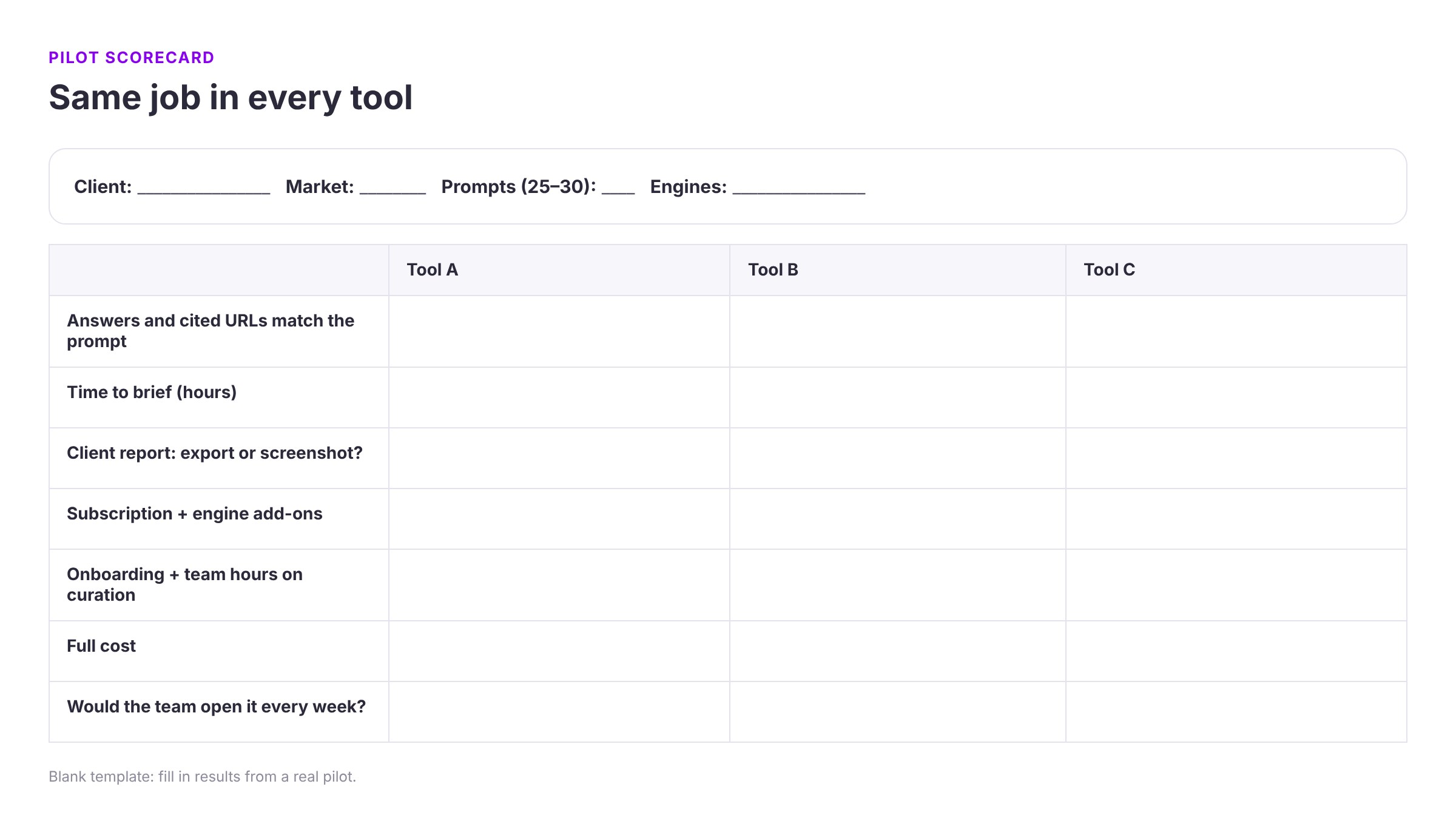
Don’t switch on a demo. Run the same job in each shortlisted tool.
- 1Pick one real client, one market and 25–30 prompts. That’s enough to see contrast, and small enough to inspect properly. Split them between early research questions and ready-to-buy questions.
- 2Lock the prompt list. Use the same prompts, engines and market in every tool.
- 3Compare the answers, not just the scores. Open the same prompt in each tool and check the answer and cited URLs.
- 4Time the brief. How long does it take to get from data to a brief your writers could start on?
- 5Build the client report. Can you export it, or will you be screenshotting?
- 6Count the full cost. Include the subscription, engine add-ons, onboarding, and your team’s hours on prompt curation and analysis.
- 7Ask your team. Would they open it every week?
Plan your migration: historical data almost never transfers between tools. Changing prompts in the same tool resets your trend lines too. Export your Otterly history before you cancel. Run both tools side by side for a few weeks if you need a before-and-after for a client.
Staying with Otterly, or using it alongside a second tool, is a perfectly valid result.
Which Otterly alternative should your agency choose?
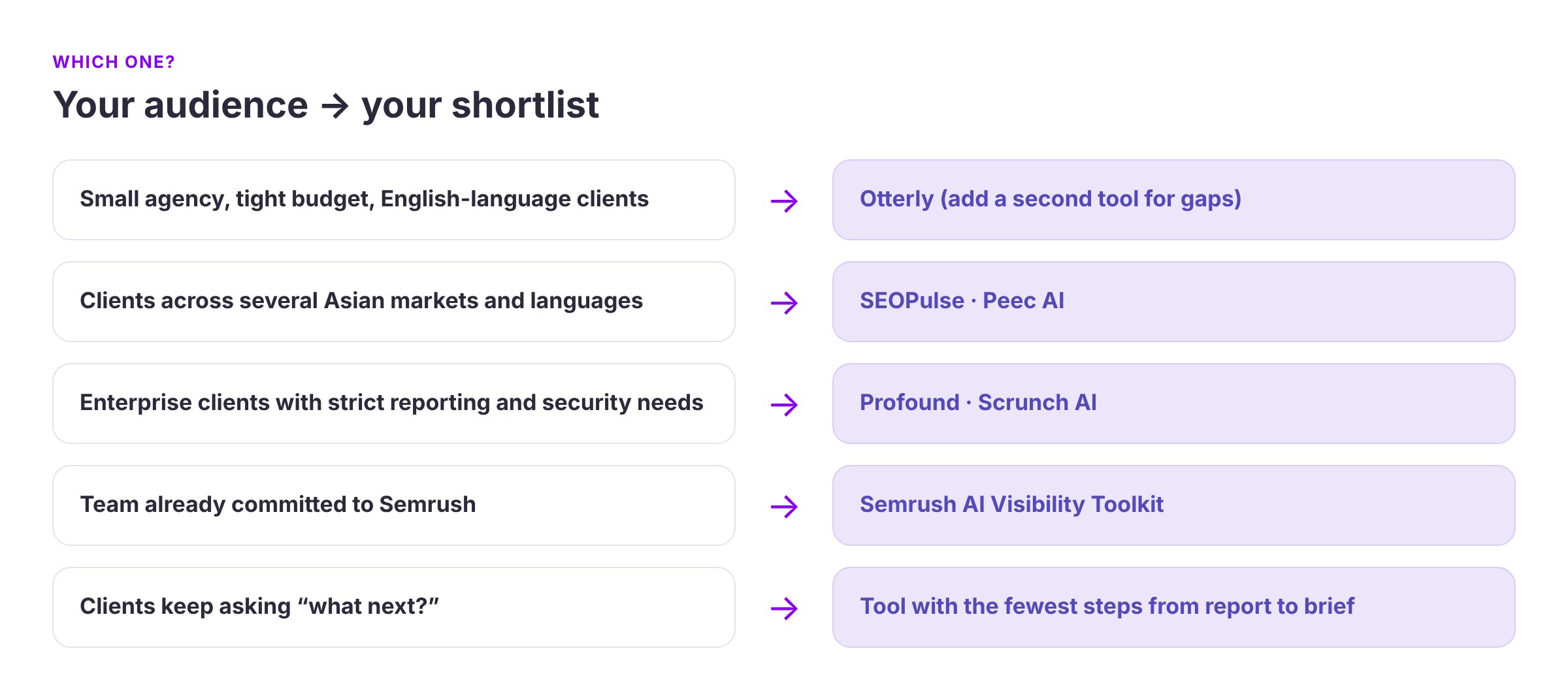
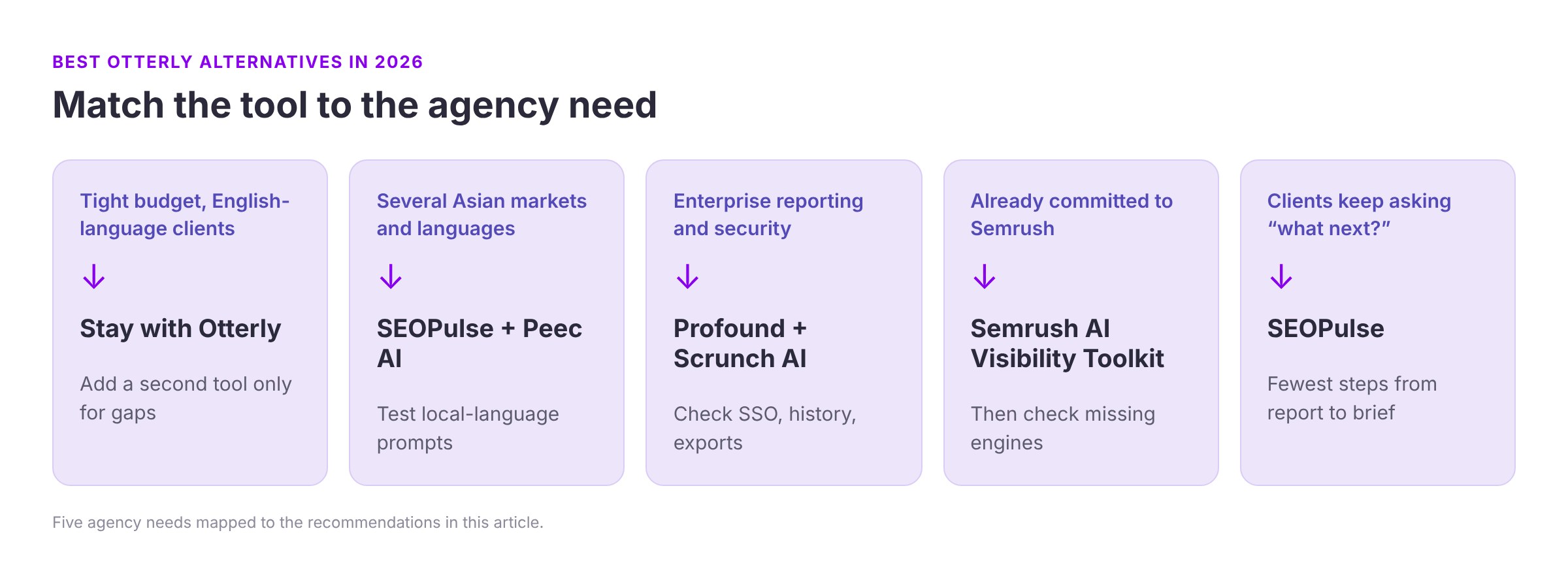
- Small agency, tight budget, mostly English-language clients: Otterly may still be right. Add a second tool only for the engines or markets it misses.
- Clients across several Asian markets and languages: shortlist SEOPulse and Peec, and test local-language prompts in each market.
- Enterprise clients with strict reporting and security needs: shortlist Profound and Scrunch, and check SSO, data history and exports.
- Team already committed to Semrush: start with the Semrush toolkit, then check which engines are missing.
- Clients keep asking “what next?”: prioritize the tool that gets you from report to brief with the fewest manual steps.
5 mistakes agencies make when switching
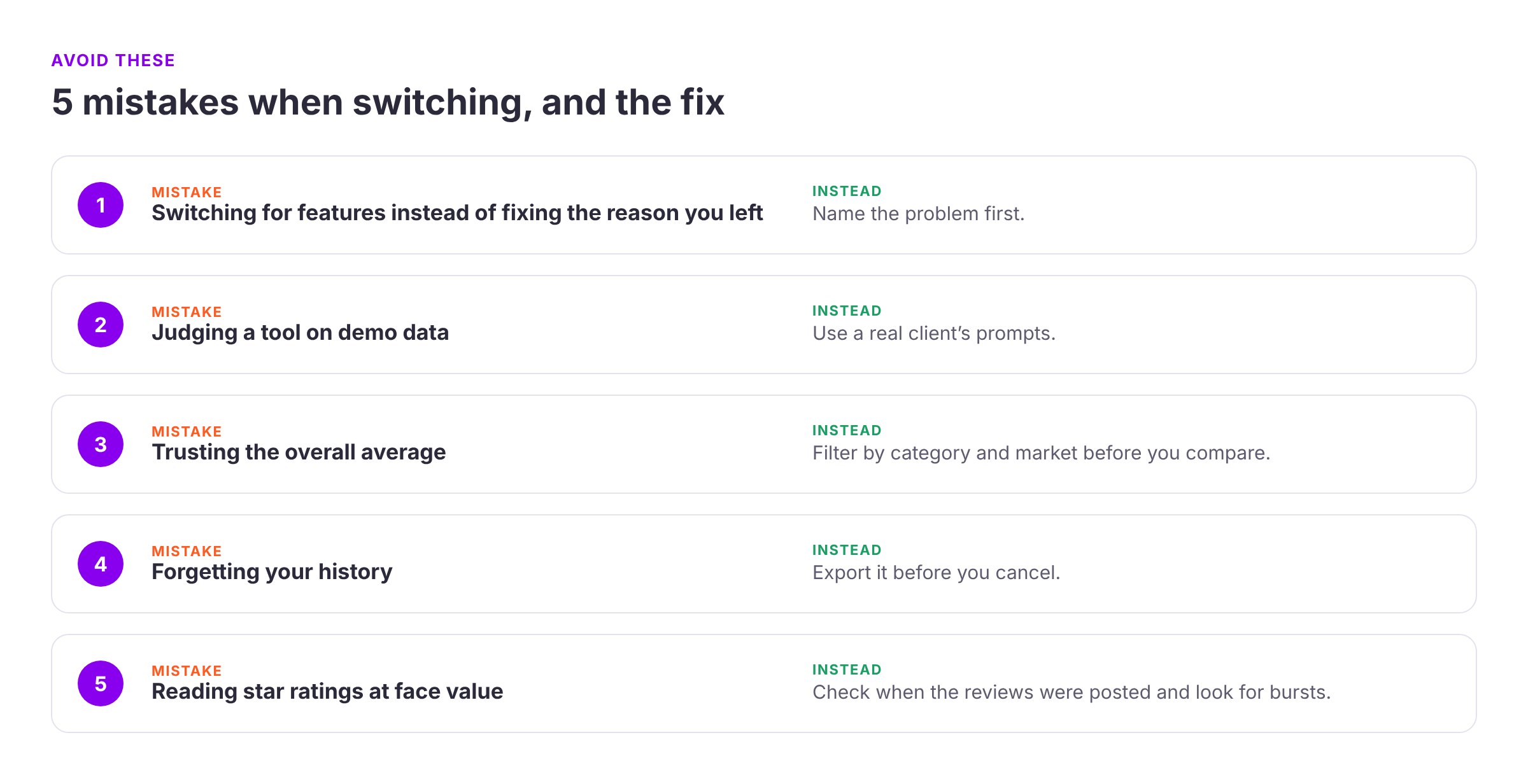
- Switching for features instead of fixing the reason you left. Name the problem first.
- Judging a tool on demo data. Use a real client’s prompts.
- Trusting the overall average. Filter by category and market before you compare.
- Forgetting your history. Export it before you cancel.
- Reading star ratings at face value. Several tools’ G2 reviews arrived in bursts: seven Otterly reviews were posted between 15 and 18 October 2025, and four Peec AI reviews on 18 March 2026. Bursts like that usually mean the vendor asked customers for reviews. Read the complaints, not just the stars.
Frequently asked questions
There isn’t one best alternative. It depends on why you’re leaving: For broader engine coverage: Scrunch AI or Profound; For a self-serve analytics workflow: Peec AI; To stay in your SEO suite: Semrush; For content briefs built from citation data, across Asian markets and languages: SEOPulse
Most tools offer a trial or a free scan rather than a permanently free plan. SEOPulse offers a free self-serve brand scan. A free scan shows where a brand stands today. It doesn’t replace ongoing tracking, which shows how visibility changes over weeks and months.
A lightweight checker shows whether a brand appears for a handful of prompts at one point in time. An enterprise platform tracks hundreds or thousands of prompts across several engines, markets and competitors over time. It usually adds deeper analysis, exports and security features.
AI answers change between runs, markets and engines, and one person’s check is a single sample. Choose a tool that lets you open the full answer behind every score and explains how and where it collects answers.
Usually, yes. History rarely transfers between tools. Export what you need before you cancel, and expect your new tool’s trend lines to start from scratch.
For a pilot or a pitch, 25–30 prompts on one product or service in one market is usually enough. For ongoing tracking, track what your client can actually influence, and keep a core set of prompts locked.
A mention is when an AI answer names your brand. A citation is when it links to a specific page as a source. They often don’t happen together, so check that your tool reports them separately.
No. Compare the same workload across tools, and include your team’s time. A cheap tool that still leaves hours of manual analysis can cost more in the end.
Test it on a real client question
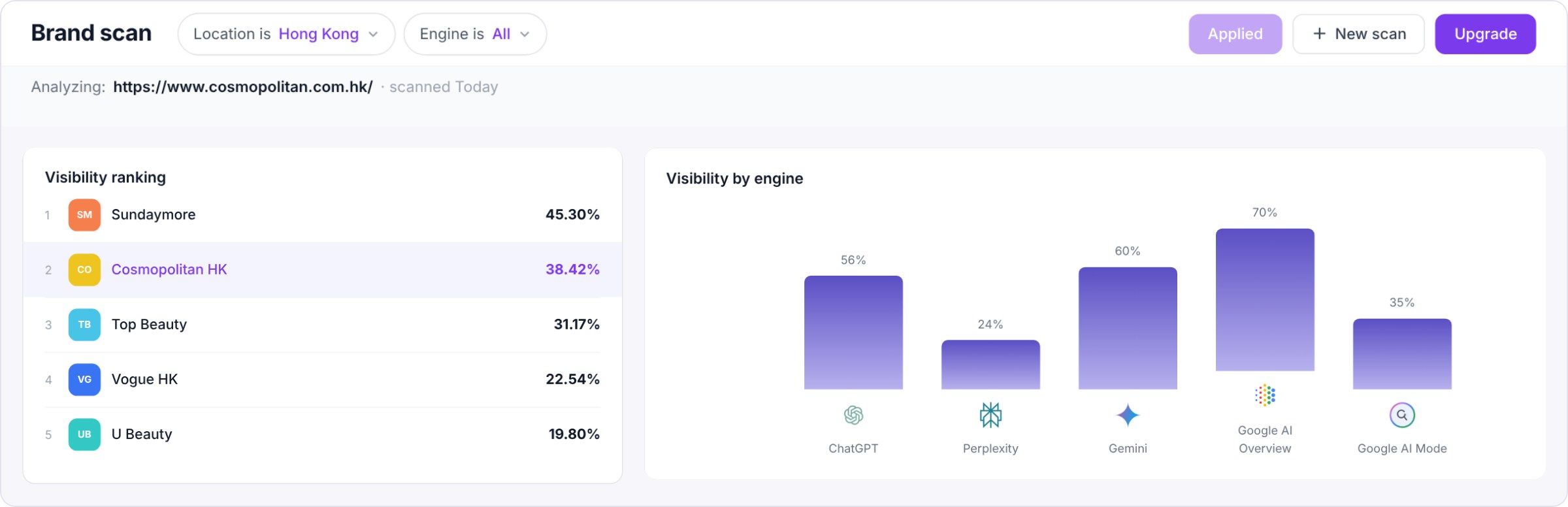
The fastest way to choose is to run one real client question through your shortlist.
Start with a free brand scan. Run SEOPulse’s self-serve brand scan at app.seopulse.io/brand-scan for a quick snapshot of where a brand stands across five AI engines, and which competitors show up instead. It’s a starting point, not ongoing tracking.

Want to see the report-to-brief workflow on your own client? Book an SEOPulse demo and bring one client question. We’ll run it in the market that matters to them and show you the answers, the cited pages and the brief inputs.
Choosing your first AI visibility tool rather than switching? Read our broader guide: Best AI Visibility Tools for Tracking Brand Mentions and Citations.
Sources
- SEOPulse, GEO & AI Search Benchmark: 755 buyer prompts and 6,811 AI answers across ChatGPT, Perplexity, Gemini, Google AI Overviews and Google AI Mode in Hong Kong and Singapore. Data collected 16 August 2026.
- SEOPulse, Citation Analysis, October 2026: 9,779 citations across 50 buyer and search queries.
- SEOPulse, Tenfold AI case study (client-reported).
- Official pricing pages, checked 10 October 2026: Otterly, Peec AI, Profound, Scrunch, Semrush AI toolkit.
- Reddit discussions:
- Hands-on reviews:
- Stateshift, Peec AI review (Peec customer)
- FounderPass, Semrush AI Visibility Toolkit review (affiliate links)
- SEOPulse conversations with agency partners, 2026.
An APAC growth operator who has worked across agency networks (OMD, PHD) and in-house at brands including Mox, Marriott and TransUnion. He has been doing SEO since the early days of the web, and built the first version of SEOPulse inside his own agency.
A tech lead with more than ten years of engineering leadership, scaling high-load systems and running technical audits. Tom architected the SEOPulse engine: the data pipelines that collect AI answers as real users see them and turn citations into clear next steps.